Are you no longer able to use your WhatsApp account? Does your phone refuse to work when you try to access the application? Apps can sometimes have technical defects, but if you get a message saying that your WhatsApp account has been blocked, then action is required and you need to contact the official WhatsApp support.
Why WhatsApp Account Block or Banned?
If WhatsApp is blocked, then there must be an important reason behind it and one of the most common reasons is, a violation of the rules. Spam messages can be an understandable example of this. The cause of the blocked WhatsApp account is usually a violation of WhatsApp’s terms of use. This messaging app has certain rules for how it is used, and if you do not follow them, you may receive a message that your WhatsApp account has been blocked. To get it unblocked, you need to find out the reasons for the block.
How to Recover Blocked or Banned WhatsApp Account?
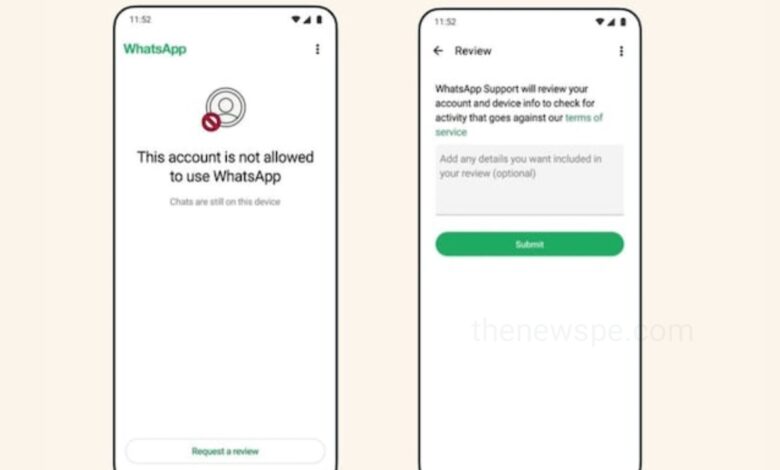
To recover a blocked or banned WhatsApp account, open the app, enter your phone number, and tap Request a review. Submit an appeal explaining your situation. If you cannot access the app, submit an official appeal via the WhatsApp Contact Page. This process usually takes 24 to 72 hours
Request a Review
- Open WhatsApp on your device. When you see the prompt stating “Your phone number is banned from using WhatsApp,” tap Support or Request a review.
- Type a brief, polite message explaining how you use the account and stating that you have ceased any unauthorized activities (like using modified apps or sending automated messages).
- Enter the 6-digit SMS verification code to link your appeal to your phone number.
Use the Online Support Form
- If you are locked out of the app entirely, you should visit the official WhatsApp Contact Page.
- Select WhatsApp Messenger Support (or WhatsApp Business Support).
- Fill out the form by providing your phone number (including country code), your email address, and the specific details of your situation.
Type of Bans
Temporary Bans
If your ban is temporary, it typically displays a countdown timer. Wait for the timer to expire, during which time you must uninstall any unauthorized third-party apps (such as GB WhatsApp or WhatsApp Plus) and switch to the official WhatsApp app.
Permanent Bans
If the message states your ban is permanent, you must use the review process outlined above. If the manual review upholds the ban, you will unfortunately need to register using a different phone number.
Humbly Request To All Visitors!
If you found above both downloading link expired or broken then please must inform admin.